 |
 |
 |
|
|
 |
|
|
|
|
|
|
 |
| Backup data |
|
| |
|
||||||||||||||||
|
|
 |

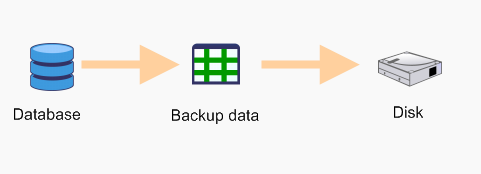
This document describes how SQL Backup performs backups, to aid readers in understanding the similarities between a backup performed using SQL Backup and one performed using SQL Server. Native SQL Server backup When you perform a backup using SQL Server, you issue s a T-SQL BACKUP command to SQL Server, with the relevant options set e.g. DISK, DIFFERENTIAL etc. E.g.
SQL Server then generates the relevant backup data and writes them out to disk or tape.
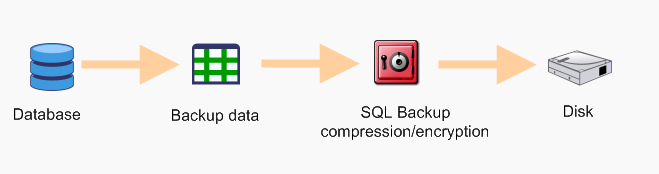
SQL Backup backup When you perform a backup using SQL Backup, SQL Backup issues a T-SQL BACKUP command to SQL Server, with the relevant options set e.g. DISK, DIFFERENTIAL etc. The command is almost similar to that used when using native SQL Server backup. One difference is that instead of the DISK option, SQL Backup uses the VIRTUAL_DEVICE option e.g.
SQL Server then generates the relevant backup data, but does not write it out to disk or tape. Instead, it informs SQL Backup where the backup data can be found. SQL Backup then compresses this data, optionally encrypts it, and writes it out to disk.
Points to note: ·The backup data is generated by SQL Server in all cases. SQL Backup does not generate any backup data. ·The backup data that is generated by SQL Server is identical (aside from block sizing issues) in both the above cases. ·Because the backup data is identical, it is possible for SQL Backup to convert its compressed files to native SQL Server backup files, using either the CONVERT command or the sqb2mtf utility. These converted files can then be restored using native SQL Server RESTORE commands. ·Because the backup data is identical, you can perform the same tasks using SQL Backup as you would using native SQL Server backups e.g.
For further details, see this document
Document history
|
|||||||||||