 |
 |
 |
|
|
 |
|
|
|
|
|
|
 |
| Truncating and shrinking the transaction log |
|
| |
|
||||||||||||||||
|
|
 |

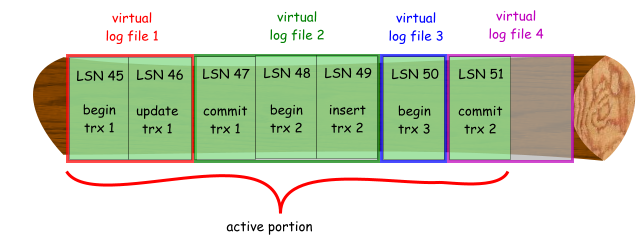
When SQL Server truncates the tranasction log, it only marks virtual log files that are no longer in use and already backed up (if running the full or bullk-logged recovery models) as reusable. Say that a transaction log contains the following log records, and is using the simple recovery mode.
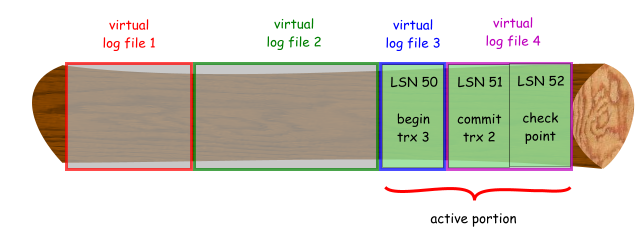
When a checkpoint now occurs, virtual log file 1 and 2 are no longer in use, as transactions 1 and 2 have been committed and the log records are not required to perform a rollback. SQL Server then marks virtual log file 1 and 2 are reusable, as follows:
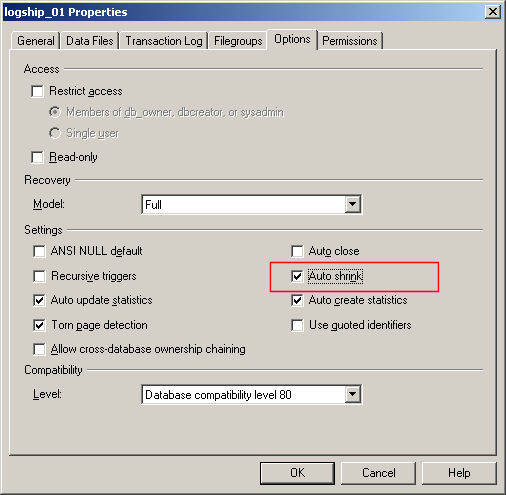
This is what is known as truncating the transaction log. Basically, the active portion of the transaction log has been truncated. The physical size of the transaction log is unchanged, unless the database has the Autoshrink property set, in which case the transaction log will be physically shrunk (where possible) at periodic intervals.
So that's for the simple recovery model - once a transaction has been committed or rolled back, SQL Server can reuse the space occupied by those transactions. As for databases running the full or bulk-logged recovery models, you will need to back up the transaction log before the log can be truncated. So if your transaction log contained the following:
Now when a checkpoint occurs, SQL Server simply writes all dirty pages to disk, but will not mark any of the virtual log files as reusable. Even if you performed a full database backup, nothing in the transaction log will be marked as reusable. The transaction log will only be truncated when you back up the transaction log e.g.
Only then will the transaction log be truncated i.e.
In order to physically reduce the size of the transaction log, which is known as shrinking the transaction log, you could use any one of the following options: ·issue a DBCC SHRINKDATABASE command ·issue a DBCC SHRINKFILE command Note that the transaction log can only be shrunk up to the boundary of a virtual log file. Here's an example of that happening. I created a new database with an initial size of 1 MB for the transaction log, and to autogrow in 5 MB increments. This database is running the full recovery model. Running DBCC LOGINFO displays the following:
There are 4 virtual log files of varying sizes. I then entered some data, which caused the transaction log to grow by 5 MB:
4 new virtual log files have been created in the new 5 MB portion of the transaction log. Each of those new virtual log files are 1310720 bytes in size. In total, 7 virtual log files are in use (status = 2). I now back up the transaction log, thus truncating the transaction log:
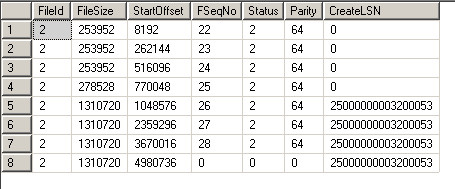
Only 1 virtual log file is in use (row 7, where status = 2). If I now try to shrink the transaction log to 2 MB using the following command:
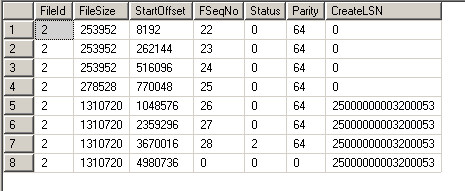
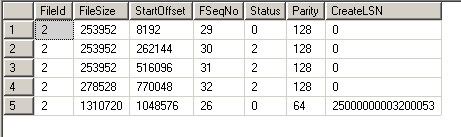
SQL Server can only delete the virtual log file 8, as the active log record is in virtual log file 7. This shrunk the transaction log from ~7 MB to ~4.7 MB. SQL Server also creates dummy entries in the transaction log, to move the latest active log record before the 2 MB point, so that it wraps around to virtual log file 2 (note the rows with status = 2):
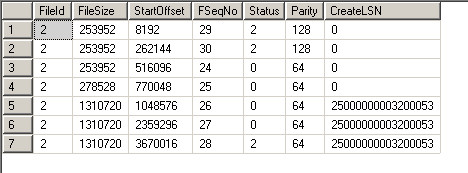
If I now back up the transaction log again, the transaction log is again truncated, and the active portion is now in virtual log file 2.
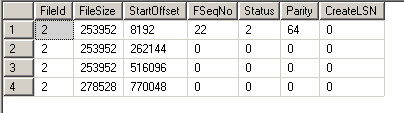
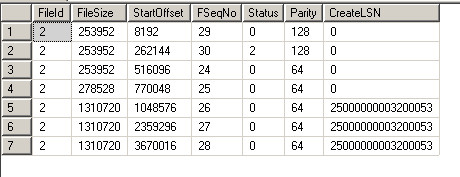
If I now attempt to shrink the file again, SQL Server succeeds in shrinking it closer to 2 MB, because the active portion of the log is within the first 2 MB. The file is shrunk up to the nearest virtual log file size that meets the entered size. The output from DBCC LOGINFO is now as follows:
and the size of the transaction log file is 2359296 bytes (the sum of all the virtual log file sizes + 8192 bytes for the header). So if you find that you cannot shrink the transaction log to a particular size, run DBCC LOGINFO and check the size of the virtual log files to know how large each of them are, and to what sizes you can actually shink the file to.
Document history
|
||||||||||||||||||