 |
 |
 |
|
|
 |
|
|
|
|
|
|
 |
| Log shipping in SQL Backup |
|
| |
|
||||||||||||||||
|
|
 |

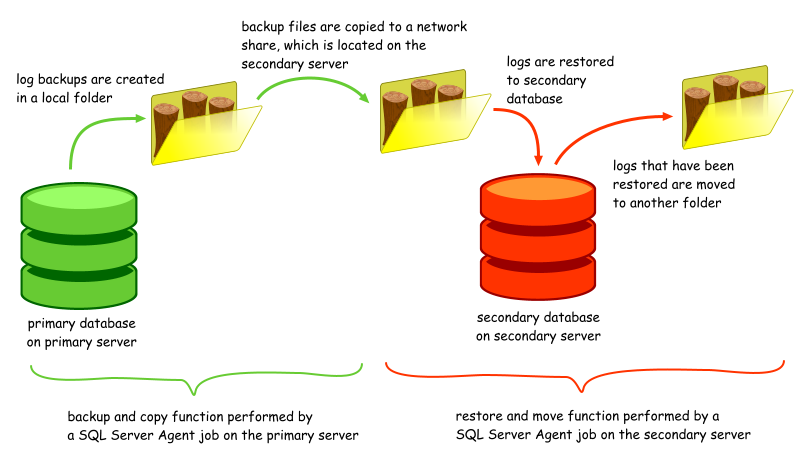
SQL Backup is a third-party SQL Server backup application from Red Gate Software. This article describes how log shipping is performed in SQL Backup. Recall that in the log shipping overview, I mentioned that the primary issues with maintaining the secondary server were as follows: ·placing or copying the transaction log backup files in a location that was accessible by the secondary server ·getting the secondary server to restore the correct files, which include skipping files that were in the midst of being copied SQL Backup addresses these issues in its own unique way.
On the primary server, backups are performed using the following syntax in SQL Backup:
This looks pretty much like a regular T-SQL backup command, except for the <AUTO> keyword. The <AUTO> keyword actually forms the file name dynamically based on a naming convention specified by the user, using tags. You could include the server, instance and database name, and also several date and time elements. So you could define <AUTO> as '<database>_<type>_<datetime yyyymmdd hhnn>.sqb', and SQL Backup might generate the following file name: AdventureWorks_log_20080531 1030.sqb. Or you could simply use the supported tags directly e.g.
To copy the files to one or more secondary locations, you use the COPYTO option in SQL Backup e.g.
Doing this instructs SQL Backup to copy the resulting backup file to the \\yohz_standby01\logship\AdventureWorks folder. You can add as many COPYTO locations as you require, so you could maintain multiple secondary servers e.g.
Thus, to set up the backup job on the primary server, you have to set up a SQL Server Agent job to run a similar backup command periodically. A common point of failure here is when the SQL Backup Agent service startup account does not have rights to the folder where the backup file is to be copied to i.e. the COPYTO locations. This takes care of the first issue. Now, how do we restore the logs on the secondary server? We simply set up a SQL Server Agent job on the secondary server to run the following command (assuming \\yohz_standby01\logship\AdventureWorks maps to H:\backups\logship\AdventureWorks on the secondary server):
Threre are 2 key differences in the restore command compared to the standard T-SQL command. Firstly, you do not specify a file name, but use a file search pattern instead i.e. FROM DISK = [H:\backups\logship\AdventureWorks\*.*]. What this does is to instruct SQL Backup to pick up all files in H:\backups\logship\AdventureWorks\ to restore (it will ignore all files that have not been fully copied). SQL Backup will then identify all the valid SQL Backup files in that list, sort them in the correct order, and restore each backup set sequentially. You could even use a more focused file search pattern e.g. AdventureWorks_log*.*. It basically depends on what other stuff you store in the folder. So, you could have a 100 transaction log backup files sitting in a folder, and assuming they are all in an unbroken sequence, you could restore all 100 files using a single restore command in SQL Backup. That saves a lot of work when compared to what you would have to do to perform the same task in SQL Server. This works even for backups that have been split into multiple files. Now you may be asking, what happens in the next run of the job? Wouldn't it pick up the same files again? Yes, it will, and that is why you have to use the MOVETO option. If you are performing log shipping, you need to use this option to instruct SQL Backup to move all the files that have been restored to another folder, in this case H:\backups\logship\AdventureWorks\restored\, so that they will not be processed again. And that's it with log shipping using SQL Backup. Backup, copy, restore, move.
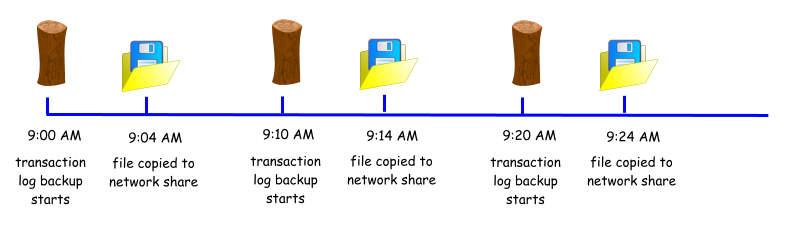
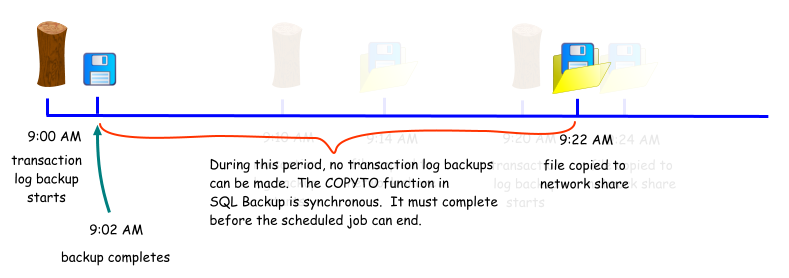
Using the integrated COPYTO option may not always be the best option, if you have low bandwidth to the remote folders, or if the servers are geographically dispersed. This is because the COPYTO function is blocking. Consider this scenario: ·your transaction log backups are scheduled to run every 10 minutes ·a transaction log backup usually takes 2 minutes to run, and 2 minutes to copy to the network share
·say for some reason, the network becomes congested, and the file now takes 20 minutes to be copied. There will be no further transaction log backups taken until the current job has completed, and that will only complete when the copying has completed.
This is unacceptable if your disaster recovery plan accepts only 10 minutes worth of data loss. Hence, you may want to consider using another application to perform the copying. Red Gate Software has generously provided 2 free but unsupported tools to address this issue. You can download them using these links: ftp://support.red-gate.com/Patches/SQL_Backup/CopyTool.zip ftp://support.red-gate.com/Patches/SQL_Backup/FTPTool.zip As the name suggests, one tool simply copies files from one folder to another, while another uses FTP to transfer files. What else do they do? Well, ·they are able to maintain a list of copied files, so only new files are copied ·they can send an e-mail notification when a copy or ftp process fails In SQL Backup 6 and later, the COPYTO function is no longer a blocking process. Instead, transaction log files to be copied are put in a queue, and are processed by an independent thread. Thus, the backup process does not have to wait for the copy process to complete before it returns.
SQL Backup offers a Log Shipping Wizard that guides you through the above tasks, and provides a starting point from which you can modify the generated scripts to fit your needs. One common complaint has been that the Wizard does not offer the option to skip the database synchronisation stage (performing a full backup and restore), and hopefully this will be addressed in a future version. Another point to note is that the script for the backup task looks something similar to this:
SQL Backup exit codes 1 to 499 are classified as warnings, and 500 and above are errors i.e. the backup failed. In a log shipping scenario, we usually want to be notified when the job fails to copy the backup file to the secondary server. A copy failure is considered a warning by SQL Backup, and will not trigger a failure in the SQL Server Agent job using the default script. To raise a warning in this situation, we need to catch exit code 145 e.g.
·How do I activate the standby databases? Use the native SQL Server RESTORE statement to bring the database online e.g.
·Can I use the multiple log restore feature outside of log shipping? Yes. Use the same syntax as you woud for a transaction log restore, but enter a search pattern that will pick up all the relevant files e.g.
·Can the multiple log restore feature work with split backups? Yes. SQL Backup will group files belonging to the same backup sets and restore them as a set. You can mix the type of backup sets (single file or multiple files) and SQL Backup will sort them out for you. ·Can the multiple log restore feature pick up files from multiple paths? Yes. Use multiple DISK options e.g.
·Can the multiple log restore feature work with encrypted files? Yes. For example, the following command
will restore all matching files that are unencrypted or have been encrypted using the password 'logship'. ·Which editions of SQL Backup support the multiple log restore feature? All editions i.e. Lite and Pro. ·Which editions of SQL Server do I need in order to set up log shipping using SQL Backup? Any version of SQL Server can be used, as SQL Backup does not use any SQL Server log shipping functionality.
Document history
|
|||||||||||||||||||