 |
 |
 |
|
|
 |
|
|
|
|
|
|
 |
| Recovery models |
|
| |
|
||||||||||||||||
|
|
 |

For each database that you create in SQL Server, with the exception of the system databases, you can configure it to use one of three possible recovery models (simple, full, bulk-logged). Here is a simple script to display the recovery models of all on-line databases:
If you are running SQL Server 2005 or later, you can use this script instead:
This is how you can change a database's recovery model to the simple recovery model:
to the full recovery model:
and to the bulk-logged recovery model:
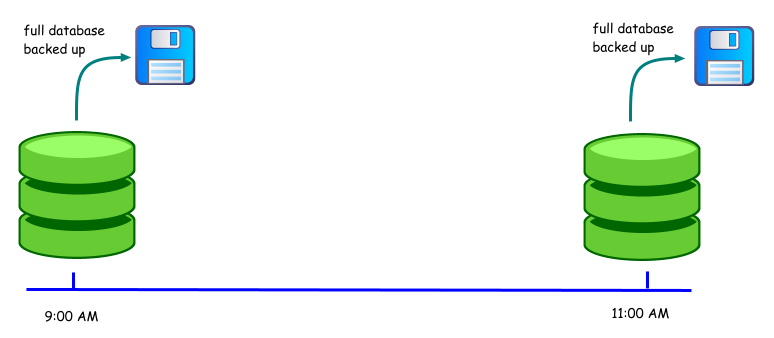
Which recovery model do you need to use? It depends on how much data you can afford to lose. Let's use the following diagram to illustrate the difference between the recovery models, where a full database backup is performed at 9:00 a.m, and 11 a.m.
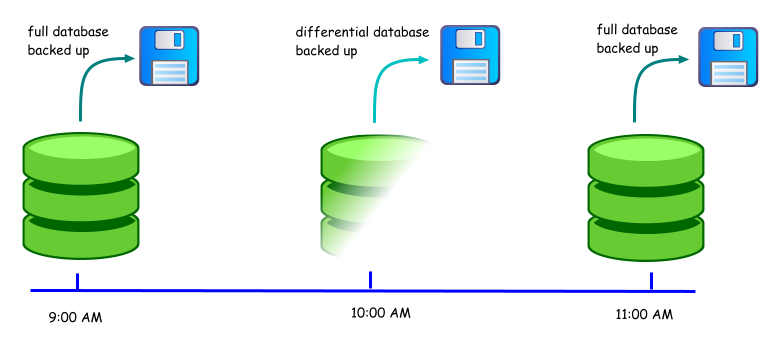
Assume that there was a hardware failure at 10:45 a.m. If the database was using the simple recovery model, you would have lost 105 minutes of work. The latest point at which you can recover the database to is 9:00 a.m, since that was the time the last full backup that was made. You could schedule differential backups to run periodically e.g.
In this case, you would lose 45 minutes of work. Now, assuming that a user deleted a critical table at 9:50 a.m. Can you recover to the point in time just before the deletion? No. The differential backup contains only the changed data pages. It cannot be used to restore to a specific point in time. You'll have to restore the database to its 9 a.m state, and redo 49 minutes of work. Then, you'll also need to redo the work that was performed after the deletion up to the time the error was discovered.
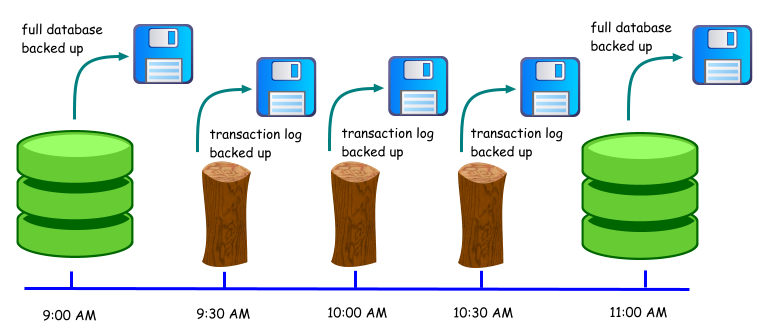
If no transaction log backups are made between 9 a.m and 11 a.m, you would face the same situation as you would if the database had been using the simple recovery model. In addition, your transaction log file would be much larger, as SQL Server will not truncate committed and checkpointed transactions until they have been backed up. Assume that the transaction log is backed up every 30 minutes:
If a hardware failure occurs at 10:45 a.m, you would lose 15 minutes of work. You can use the full database backup at 9 a.m, and apply the transaction logs to bring the database to its state at 10:30 a.m. What if some critical data was deleted at 9:50 a.m? Using the transaction log backup that was made at 10:00 a.m, you can restore the database to its state at 9:49 a.m. You would still need to redo the work that was performed between the time of the deletion up to the time the error was discovered, as you cannot restore up to 9:49 a.m, skip the 9:50 a.m transactions, and restore the later transactions. Admittedly, that would be great.
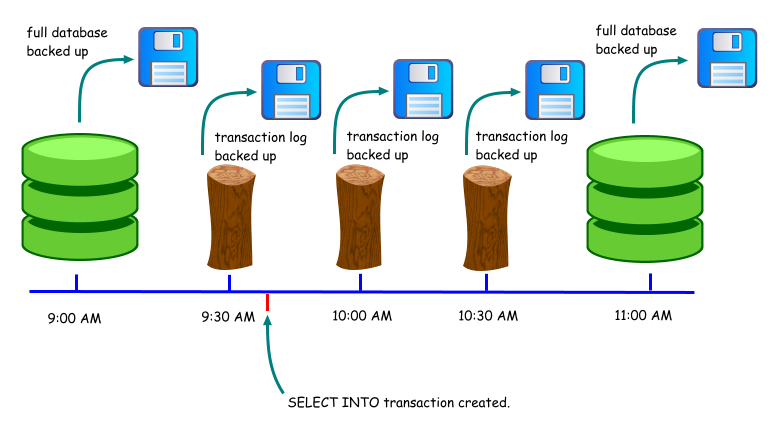
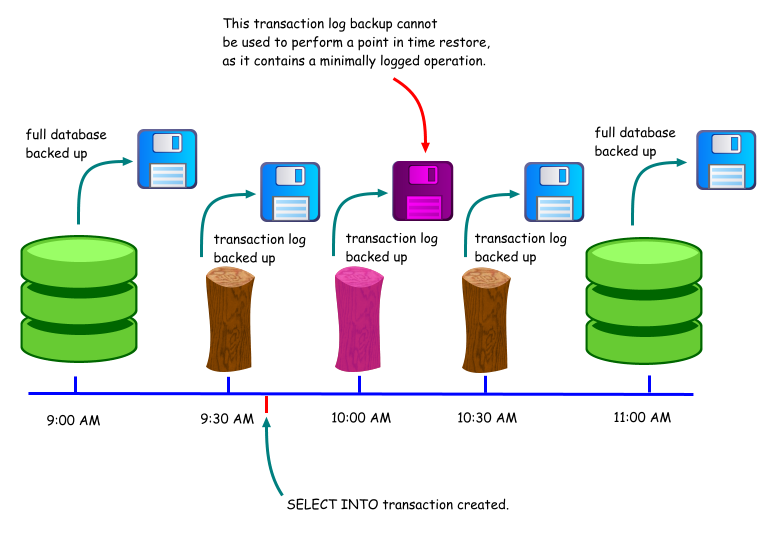
The situation with the bulk-logged recovery model is identical to the full recovery model if no minimally logged transactions are created in the database. An example of a minimally logged transaction is a SELECT INTO operation. Say that such a transaction occurred at 9:40 a.m.
This transaction would be minimally logged, which means that SQL Server only records the changed database pages arising from the transaction. It does not log every insert into the new table. Again, say that a critical table was deleted at 9:50 a.m. What happens now? You can no longer restore the database to its state at 9:49 a.m, as the transaction log backup created at 10:00 a.m cannot be used to restore to a specific point in time. The best you can do is to restore the database to its state at 9:30 a.m. Whenever a transaction log backup contains one or more minimally logged transactions, you cannot use that backup to perform a point in time restore.
Why then would anyone use the bulk-logged recovery model? The main reason is performance. Let's use the example of a SELECT INTO operation, say creating a large table from the results of a query. If using the full recovery model, the details of every insertion into the new table is logged, and the transaction log will consume more space. If using the bulk-logged recovery model, only details of the modified data pages are logged, allowing for better performance. As we have seen, this comes at the expense of being able to perform a point in time restore using the transaction log. The operations that are minimally logged are as follows (taken from SQL Server 2005 Books Online): ·Bulk import operations (bcp, INSERT ... SELECT * FROM OPENROWSET(BULK...), and BULK INSERT). ·text, ntext, and image operations using the WRITETEXT and UPDATETEXT statements when inserting or appending new data. Note that minimal logging is not used when existing values are updated. ·SELECT INTO operations. ·Partial updates to large value data types using the UPDATE statement's .WRITE clauses when inserting or appending new data. Note that minimal logging is not used when existing values are updated. ·If the database recovery model is set to either bulk-logged or simple, some INDEX DDL operations are minimally logged whether the operation is executed offline or online. ·DROP INDEX new heap rebuild (if applicable). See Books Online for more details (Bulk-Logged Recovery [SQL2000], Backup Under the Bulk-Logged Recovery Model [SQL2005]).
In summary, the simple recovery model provides the least number of options for recovery, but is the simplest to manage. The full recovery model allows for the most flexibility when it comes to restoring databases. The bulk-logged recovery model sacrifices some of those flexibility, in return for better performance for bulk operations. See Books Online for a more detailed comparison of the recovery models (Selecting a Recovery Model [SQL2000, SQL2005]).
See also: ·Using bulk-logged recovery model but transaction log backup is still large ·Backup and restore history details
Document history
|
|||||||||||||||||||||