
Home

Restoring to the latest possible state

Prev Page Next Page
Introduction
Recovery models
Main backup types
Backing up the database files by copying
The transaction log
Transaction log restore sequence
Log sequence numbers
Truncating and shrinking the transaction log
Backing up the tail
Inside the transaction log
So, what's in a backup file?
Test: A full backup does not contain deleted data
Verifying backup files
Verifying backup files on a budget
Cumulative backups
Recovering individual tables
Backup and restore history details
Backup reads and writes
Speeding up backups
Backup speed details
Speeding up restores
Restore state affects speed too
Backup and restore rights
Log shipping
Log shipping in SQL Server 2000
Setting up log shipping using Enterprise Manager
Checking the set up
Failover
Log shipping in SQL Server 2005
Setting up log shipping using Management Studio
Checking the set up
Log shipping status report
Failover
Log shipping in SQL Backup
Using the CopyTool utility
Failover
3rd party backup applications
VDI
VDI versions
VDI errors
SQL Backup - beyond compression
Restoring a chain of transaction log backups
Restoring to the latest possible state
Backing up multiple databases
Backup retention
Making a copy of the backup file
Backup file naming conventions
Restoring the latest backup set
Network resilience
Encryption
Common SQL Backup issues
Installation checklist
Setting up rights
Configuring service rights
Backup data
Hanging issues
Common backup and restore errors


# available only in SQL Backup 6.4 and newer

Let''s say for a given database, you have a set of full backup files, another set of differential backup files, and finally a set of transaction log backup files. You now want to restore a new database using those backup files, perhaps for reporting or data extraction purposes. You will then need to identify the latest full database backup file, followed by the latest differential backup file, and finally the set of transaction log backup files. Your restore set of commands could look like this:
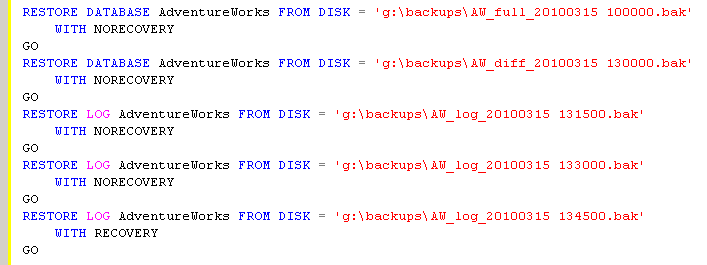
latestall_01

Using SQL Backup
, you just use the LATEST_ALL option to restore a database to its latest possible state given the available backup files e.g.

latestall_02

Now, if you were restoring the database on the original SQL Server instance itself, you don't even need to provide the directories where the backups are stored. You can use the information from the backup history tables itself e.g.

latestall_03

If restoring using information from the backup history tables, you can even restore to a different database name e.g.

latestall_05


Discuss or comment on this article on our Facebook group.

Tell your friends on Facebook about this article. Tweet about this article. E-mail your friends about this article.


Document history
7/1/2010    Initial release.    

 
Copyright © 2008-2010 Yohz Ventures Sdn Bhd. All rights reserved.
All product and company names are trademarks or registered trademarks of their respective owners.

Converted from CHM to HTML with chm2web Pro 2.75 (unicode)