 |
 |
 |
|
|
 |
|
|
|
|
|
|
 |
| Log shipping |
|
| |
|
||||||||||||||||
|
|
 |

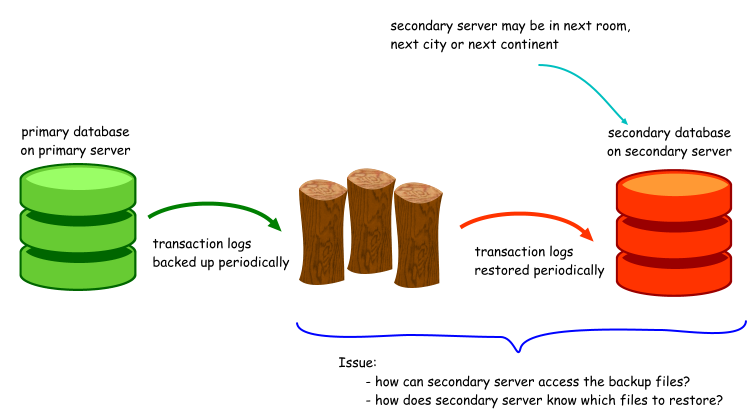
Log shipping is a term used to describe the process of taking a transaction log backup from a primary database, and restoring the transaction log backup on a secondary database. Why would you want to do this? Among the more common reasons: ·to have a standby database ready in case of a service disruption to the primary database ·to have a read-only copy of the primary database available on another server, in order to lighten the load on the primary server ·to have multiple copies of the database available in different locations
The backup is the easy part. You just need to ensure that your database is running the full or bulk-logged recovery models. It's the restore part that gets a little tricky (I'm working on the common assumption that the secondary server is a physically different server). Like: ·how can the secondary server access the backup file ·how will the secondary server know which files to restore ·how will the secondary server know which files not to restore, as they may be in the process of being copied SQL Server provides a GUI interface to assist you in setting up log shipping between a primary database and one or more secondary databases. However, it is only available in certain editions of SQL Server. In SQL Server 2000, it is available only in the Developer and Enterprise editions. In SQL Server 2005, it is available in all editions except the Express edition. Using the SQL Server log shipping configuration may not always be suitable, for e.g. if the primary and secondary databases are not linked. You can always set up log shipping manually, but you'll need to address the abovementioned issues.
Another consideration when performing log shipping is that the logins on the primary database needs to be synchronised with the secondary database when failover occurs. BOL suggests using the bcp function to periodically export the master..syslogins table (SQL 2000), or sys.syslogins (SQL 2005). During failover, you will need to use the sp_resolve_logins stored procedure to resolve the logins. After that, you may need to relink orphaned users using the sp_change_users_login stored procedure. You can find more details on how to resolve orphaned users in Troubleshooting Orphaned Users [SQL2000, SQL2005].
Document history
|
|||||||